How to Check and Adjust Flex Farm Nutrients and pH
Updated
Check your Flex Farm pH and nutrient levels at the same time. Your target pH is 6.0 (yellow), and your nutrient Target Number is your Base Number plus 700.
Grow Video: Checking & Adjusting pH & Nutrients
When checking and adjusting your pH and nutrients, it is recommended to check and note your pH and nutrient levels at the same time. After checking your levels, add your nutrients, and then the pH adjuster, if needed.
Checking pH
Step 1
To check your pH, locate the pH test kit and measuring cup from the Grower Toolkit. Fill your measuring cup with water out of the end of the drip line. Dip the vial into the water or pour into the vial, filling it halfway.
Step 2
Add 2 - 3 drops of indicator solution to the vial and shake to combine.
Step 3
Compare the color in the vial to the indicator solution bottle label. Your target pH is 6.0, which will appear as a yellow reading. A slightly yellow-green or yellow-orange is also acceptable, and no adjustment is necessary.
Caution: The pH kit contains caustic materials. Keep out of reach of children. Handle carefully to avoid personal injury.
Checking Nutrient Levels
- Use the TDS meter from the Grower Toolkit to test the concentration of minerals in the Flex Farm water and establish a target nutrient level.
- Press the ON/OFF button to turn on the TDS meter. The reading should be 0 PPM (parts per million).
- Dip the lower part of the TDS meter into the measuring cup filled with plain water from the Flex Farm.
- Avoid submerging the TDS meter more than 1-2 inches into the water. The TDS meter is not waterproof and will malfunction if fully submerged.
- Wait 5-10 seconds to take a reading. With the TDS meter still submerged, press and hold the HOLD button.
- Remove the meter.
- The number that appears on the screen is your Base Number (TDS reading of your water).
RECORD YOUR BASE NUMBER HERE:
(Plain water reading)
RECORD YOUR TARGET NUMBER HERE:
Calculate your nutrient Target Number by adding 700 to your Base Number.
Example: Base Number: 200 PPM
200 + 700 = 900
Target Number = 900 PPM
(maintain this number weekly)
RECORD YOUR TARGET NUMBER IN YOUR QUICK REFERENCE GUIDE FOR FUTURE USE.
Note: Base PPM readings above 300 can result in difficult water control. RO filter will significantly reduce PPM of water supply. You can purchase an RO filter from the Fork Farms Store.
Adding Nutrients
- Add nutrients and pH through the left tank lid as this is the tank with the pump in it. The nutrients and pH adjusters will equalize faster and give you a more accurate reading moving forward.
- Always add equal parts of Nutrient A and B. A 1:1 ratio of 1 tablespoon of Nutrient A and 1 tablespoon of Nutrient B equals a rise in approximately 230 ppm.
- With a fresh tank of water, we recommend starting with 3 tablespoons of Nutrient A and 3 tablespoons of Nutrient B.
- Fill your measuring cup with 2 cups of water and add 3 tablespoons of Nutrient A. Stir until the nutrients are dissolved. Pour the nutrient mixture into the left tank (with the water pump).
- Repeat the process for Nutrient B. Fill your measuring cup with 2 cups of water and add 3 tablespoons of Nutrient B. Continue to stir until the nutrient is almost completely dissolved. Pour into the left tank.
- Recheck the nutrient levels after a couple of hours and adjust as needed.
Note: Do not put the nutrients directly into the Flex Farm tanks as they will not fully dissolve. Ensure you are mixing the nutrients in a separate container. This is especially important to dissolve Nutrient B.
If the TDS reading is within +/-100 of the Target Number recorded:
It is within range and no additional nutrients are necessary.
If the TDS reading is more than 100 ppm below the Target Number recorded:
Continue to add equal parts of Nutrient A and Nutrient B in 1 tablespoon increments. 1 tablespoon each of Nutrient A and B approximately equals an increase of 230 ppm. Let your Flex Farm run for a few hours before taking a new TDS reading. Repeat until your TDS reading is within 100 ppm of your Target Number.
If the TDS reading is more than 100 ppm above the Target Number recorded:
Remove some of the water in the tank and refill with plain water. After running your Flex Farm for a few hours, take a new TDS reading. Repeat until your TDS reading is within 100 ppm of your Target Number.
Balancing pH
If the reading is more than slightly green (towards blue), adjust as follows:
Add 2 tablespoons of pH Down solution to the left Flex Farm tank. Check the pH again after 24 hours and a few times over the next couple of days, adjusting as needed until stabilized.
If the reading is more red, adjust as follows:
If your pH reading is more red we recommend removing water and adding fresh water to your Flex Farm. Check the pH again after a few hours, adjusting as needed.
Note: If you are transplanting, your nutrient and pH levels do not need to be within their ideal ranges before you begin. We recommend completing your initial adjustment and transplanting at the same time. Continue to monitor and adjust over the next few days.
Why am I getting such a low TDS reading after adding 3+ Tablespoons of both A and B to the tanks?
If you have added more than 4 Tablespoons of A and 4 Tablespoons of B, test your water with your TDS meter and press hold to save the reading. Take a look to see if your meter is displaying a small "x10" after the numbers. If so, multiply your reading by 10. Our current meters only display 3 digits, so if your nutrients are over 999 PPM, you will need to take the "x10" into account.
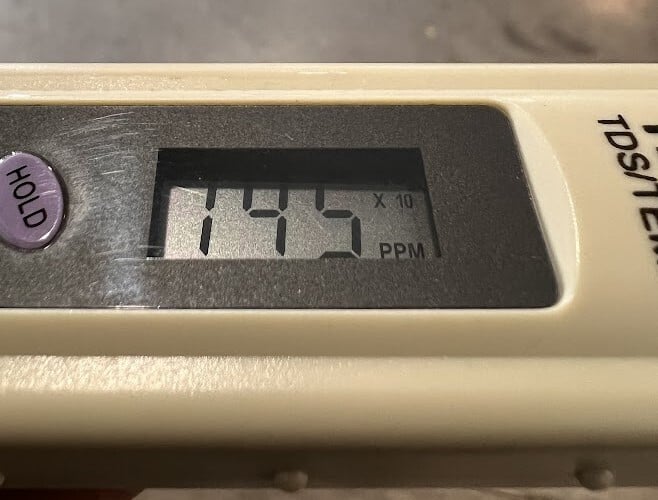
Example:
If your meter is displaying 145 with a “x10” after it, your actual reading is 1450 PPM! Leafy greens and herbs do not like their nutrients too far above 1000 PPM, so we recommend diluting the nutrients inside the tanks.
How to dilute the tanks:
- Add fresh tap water to dilute the concentration if you have room in the tanks
- If your tanks are too full to add new fresh water, drain the tanks a quarter at a time, and add fresh water to dilute the nutrients in the tanks.
- Allow the pump to recirculate the tanks.
- Take a new nutrient reading and repeat if necessary.
- We recommend adding more fresh water if necessary to get the nutrients close to your Target Nutrient Reading: +/- 100 PPM from your Target Nutrient Reading is okay.
- Follow up with testing and adjusting your pH levels to about 5.5- 6.0 (yellow).